Unicorn Wishes: Integrating Whimsy into Your Design Workflow
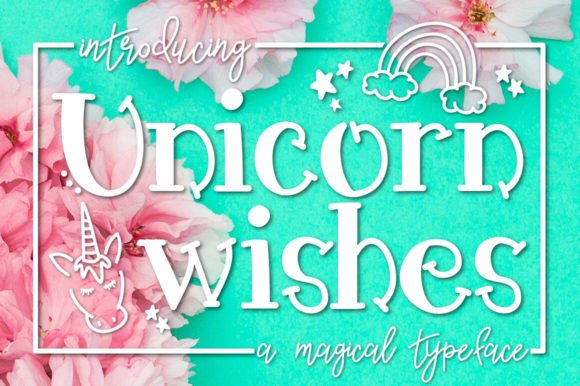
In the landscape of professional design, typography is often viewed through the lens of utility—serif fonts for readability in long-form text, sans-serifs for clean user interfaces, and monospace for coding. However, there is a distinct category of typography that serves a different purpose entirely: emotional resonance and thematic anchoring. Unicorn Wishes falls squarely into this category. It is a magical and whimsical serif font designed to bring a touch of fantasy and wonder to projects. For the designer, marketer, or small business owner, understanding how to deploy a specialty font like this is less about "playing" and more about strategic emotional connection.
Understanding the Asset: Beyond Standard Serifs
Before integrating Unicorn Wishes into a workflow, it is essential to understand its technical and aesthetic composition. Unlike a transitional serif like Times New Roman, which prioritizes legibility, this font prioritizes atmosphere. Its playful letterforms are engineered to evoke a sense of innocence and delight. However, the real value for a creator lies in the included extras. The font package typically includes distinct glyphs—unicorns, rainbows, and stars—that function as typeable characters. This transforms the font from a mere text generator into a lightweight vector library. Recognizing this dual function allows you to plan your asset management more effectively, treating the font both as a text tool and an icon set.
Strategic Implementation in Project Planning
The most common mistake professionals make with novelty fonts is using them for body copy. Unicorn Wishes is not designed for readability in paragraphs; it is designed for impact in headlines. In a standard design process, this font should be introduced during the ideation phase. When scoping a project for a children’s brand, a fantasy-themed event, or a playful product launch, identifying the font early ensures that the surrounding visual hierarchy supports its whimsical nature.
Consider the workflow of creating a birthday invitation suite. The process usually involves layout planning, copywriting, and asset sourcing. By selecting Unicorn Wishes during the sourcing stage, you immediately define the "voice" of the project. This decision dictates subsequent choices: color palettes must likely be pastel or vibrant to match the font’s energy, and imagery should lean toward illustration rather than photography. Therefore, the font acts as a stylistic anchor, streamlining the decision-making process for all other design elements.
Technical Integration and Software Compatibility
For the working professional, compatibility is a non-negotiable factor. Unicorn Wishes is built for versatility across print and digital environments. Whether you are using Adobe Creative Cloud (Illustrator, InDesign, Photoshop) or web-based platforms like Canva, the font installs as a standard TrueType or OpenType file.
When integrating this into your digital assets, consider the following workflow adjustments:
- Installation Management: If you manage a large library of assets, categorize Unicorn Wishes under "Thematic" or "Display" fonts in your font manager. This prevents you from scrolling past it when looking for workhorse fonts.
- OpenType Features: If the font utilizes OpenType features for stylistic alternates, ensure your software supports glyph panels. This allows you to swap standard letters for more ornate versions, adding a custom feel to the typography without manual vector editing.
- Web Embedding: If using the font for a landing page or blog header, check the licensing for web embedding (WOFF/WOFF2 formats). Using it for high-impact hero text can increase dwell time on pages targeting parenting or fantasy audiences.
Workflow Example: Social Media Content Calendars
For the social media manager or content creator, consistency is key. A practical way to use Unicorn Wishes is within a branded template system. Suppose you run a small business selling children’s apparel. You can create a series of Instagram story templates in Canva or Photoshop where Unicorn Wishes is reserved exclusively for the "Hook" or "Headline" text.
The process looks like this:
- Template Creation: Design three to five base templates with placeholder text using Unicorn Wishes.
- Asset Pairing: Pre-select the glyph extras (stars and rainbows) to act as bullet points or decorative separators.
- Batching: During your weekly content planning session, drop your weekly copy into these templates. Because the font is already set, you save time on formatting and ensure brand consistency.
Enhancing Educational and Print Materials
Educators and freelancers creating learning materials face a unique challenge: maintaining engagement. Unicorn Wishes is particularly effective in this sector. When designing worksheets, flashcards, or classroom decorations, the font serves a functional purpose—it grabs the student's attention.
In a workflow context, you might use this font to differentiate question text from answer text, or to highlight key vocabulary words. For example, a vocabulary worksheet might use a standard sans-serif for definitions, while the target word is displayed in Unicorn Wishes. This visual coding helps students navigate the document faster. Furthermore, using the integrated star or rainbow icons as checkmarks or reward indicators streamlines the grading process, adding a gamified element to the educational experience without requiring additional graphic design software.
Brand Identity and Long-Term Use
While novelty fonts are often associated with one-off events, Unicorn Wishes can play a role in long-term branding for specific niches. If you are a fantasy author, a children's party planner, or a game developer, this font could become a staple of your brand identity.
However, long-term use requires quality control. Overuse can dilute its impact. A best practice is to pair Unicorn Wishes with a neutral, geometric sans-serif. This creates a professional contrast that grounds the whimsy. For instance, use Unicorn Wishes for your logo and major campaign headlines, but switch to a font like Montserrat or Open Sans for sub-headers and body copy. This balance ensures your brand remains approachable to adults (parents, buyers) while appealing to the wonder of the end-user (children).
Compatibility with Broader Design Trends
Design trends often cycle between minimalism and maximalism. Currently, there is a resurgence of "kidcore" and nostalgic, retro-fantasy aesthetics in digital marketing. Unicorn Wishes fits perfectly into this zeitgeist. By incorporating it into your current projects, you are aligning your output with contemporary visual languages that resonate with specific demographics.
Furthermore, the font interacts well with other digital resources. It sits comfortably atop watercolor backgrounds, pairs well with vector illustrations, and can be extruded into 3D text using basic software effects. This flexibility makes it a valuable asset in your toolkit, capable of adapting to various creative constraints.
Conclusion: The Utility of Magic
Ultimately, Unicorn Wishes is more than just a collection of curves and loops; it is a workflow tool for conveying specific emotions. By planning its usage, managing its technical integration, and pairing it with complementary assets, you can leverage this font to elevate your projects from standard to enchanting. Whether for a single invitation or a cohesive brand identity, the practical application of this whimsical serif font lies in its ability to tell a story before the reader even processes the words.