Dino Roar: A Practical Guide to Choosing and Using This Playful Font
Choosing the right typeface for a children's project is about more than just aesthetics; it's about communication, engagement, and usability. The Dino Roar font is a fantastic example of a thematic typeface designed specifically to capture the imagination of young audiences. Its whimsical, dinosaur-themed characters are perfect for everything from birthday invitations and party decorations to educational worksheets and playful branding. For designers, educators, and parents, understanding how to leverage a font like Dino Roar effectively can transform a simple project into a captivating experience for a child.
Why Dino Roar Stands Out for Children's Design
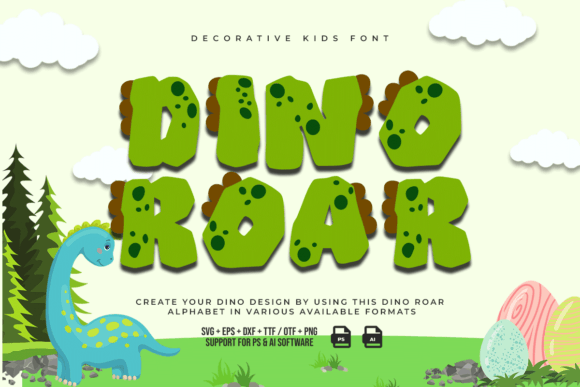
At its core, Dino Roar is more than just letters on a page. Each glyph is crafted with personality, featuring charming details that evoke a sense of prehistoric adventure. This design philosophy aligns perfectly with how children interact with visual content. A font that is fun and distinctive can hold a child's attention longer, making learning materials more engaging and party invitations more exciting. The font's PUA encoding is a significant technical advantage, ensuring that all its decorative swashes and special characters are easily accessible in any design software, which streamlines the creative process for professionals and hobbyists alike.
Common Pitfalls When Using Thematic Fonts Like Dino Roar
Despite its appeal, using a highly stylized font requires a thoughtful approach. A frequent mistake is applying a font like Dino Roar to body text in a long document. While its playful shapes are captivating for headlines and titles, using them for paragraphs can severely hinder readability. Children, especially early readers, benefit from clear, simple letterforms for extended reading. The goal is to use Dino Roar to enhance the content, not to create a barrier to understanding it.
Another oversight is neglecting font pairing. Dino Roar has a very strong personality. Pairing it with another equally ornate or bold typeface can create visual chaos, making a design feel cluttered and confusing. The key is balance. A clean, simple sans-serif or a friendly, rounded sans-serif often makes the perfect companion, allowing Dino Roar's headlines to shine while ensuring any supporting text remains crystal clear.
Ensuring Quality and Legibility Across Sizes
It's crucial to test how a font performs at different scales. A design that looks wonderful on a computer screen might lose its charm or become illegible when printed small on a worksheet or viewed on a mobile device. Before finalizing a project, always print a test page or view it on a tablet. Check that the unique details of each Dino Roar character—like the dinosaur tails or playful dots—are still discernible and contribute positively to the design at the intended size.
Practical Advice for Better Results
To make the most of Dino Roar, consider it a specialized tool in your design toolkit, not a one-size-fits-all solution. Here’s how to apply it effectively:
- Use for Impactful Headlines: Deploy Dino Roar for titles, chapter headings, key instructions, or the name on an invitation. This is where its personality can create maximum impact without compromising the readability of the main content.
- Pair with Simplicity: Choose a neutral, easy-to-read font for any body copy, instructions, or smaller text. Fonts like Open Sans, Nunito, or even a simple serif like Georgia can provide a clean, professional foundation that lets Dino Roar's creativity take center stage.
- Mind the Context: Think about the end product. For a birthday banner, full-size Dino Roar is perfect. For a child's storybook, use it for the title and chapter headings, but opt for a highly readable font for the narrative text itself.
- Explore All the Glyphs: Take advantage of the font's PUA encoding. In your design software's glyphs panel, you can often find alternate characters, swashes, and special symbols that can add unique flair to your project.
A Realistic Example: The Birthday Invitation
Imagine you're creating a dinosaur-themed birthday invitation. Using Dino Roar for the child's name and the headline "You're Invited!" immediately sets the fun, thematic tone. For the party details—the date, time, location, and RSVP information—you would switch to a clean, legible font. This approach ensures the invitation is both visually exciting and functionally clear, so guests can easily read the important information. This balanced method prevents the common error of prioritizing style over substance.
What to Check Before You Commit
Before downloading or purchasing any thematic font, including Dino Roar, it's wise to do a quick evaluation:
- License and Usage Rights: Confirm the font's license covers your intended use, whether it's for personal projects, commercial products, or client work.
- Character Set and Language Support: Ensure the font includes all the characters you need, such as numbers, punctuation, and any special letters for your language.
- Technical Compatibility: Verify the font file format (like .OTF or .TTF) works with your operating system and design software. The PUA encoding of Dino Roar is a major plus here for cross-software compatibility.
- Visual Testing: If possible, use the font preview tool to type out key words or phrases from your project. This gives you a realistic feel for how it will look in your specific context.
Ultimately, a font like Dino Roar is a powerful asset for creating joyful, engaging content for children. By understanding its strengths and applying it with careful consideration for readability and context, you can avoid common pitfalls and ensure your designs are not only beautiful but also effective and delightful for their young audience. The roar it brings is one of fun and creativity, used wisely to support clear communication and a wonderful user experience.